How to increase battery life on an Android Device.

Android devices are easy to use, have a nice UI, good perfomance, but battery life can be a major drawback in most devices. but with a few precautions, we can increase battery life,

  • Do not use Live Wallpapers. They're nice, but they drain battery.
  • [for HTC] Do not use Sense UI. That is HTC's home app. It may look good, but it also drains battery.
  • Prefer the back button over the home button. The back button lets apps decide if they want to run in the background. The home screen often leaves apps running when they don't need to.
  • Don't use app killers! There's no need for them if you use the back button, and you'll end up crippling other apps because of non-obvious dependencies between apps.
  • Use WiFi whenever you have access to a network because it uses less battery than 4G. (Shorter distance, lower power.) Turn WiFi off when you don't have access to a network, otherwise it will keep looking for a WiFi network it can use (which drains battery).
  • Reduce the frequency at which apps refresh their content, Like social media clients (Twitter, Facebook, etc.), email, and news or weather apps.
  • Finally, watch your battery usage under Settings -> About Phone -> Battery -> Battery Use. This will show you what has been using the battery since it was last charged. (So it shows nothing while charging!) If anything unexpected is using the battery, consider replacing it with another app or service.
Continue Reading

How to install programs on USB stick

Applications like UNetbootin from the default Ubuntu repositories, Will allocate space used to preserve files across reboots.

The default size of the persistent storage space is 0 MB, but it can be changed from the default size at the same time that you create the Ubuntu live USB.

 In the below screenshot the persistent storage space is 4GB on an 8GB USB flash drive with one FAT32 partition ( /dev/sdd1 ).

UNetbootin

The persistent storage space enables you to install software or save files on an Ubuntu live USB persistently across reboots. The persistence feature is not supported on Ubuntu 16.04 and later.
UNetbootin is compatible with Windows, Mac and Linux, however UNetbootin has been dropped from the Ubuntu 18.04 repositories. 
Continue Reading

How to quickly kill an app in Android

Well there is well prepared app for this function called Gravity Box, for using this app, your device has to be rooted. Here is a tutorial on rooting your Android Phone. 


After your device is rooted, it's easy. 


  • Install Gravity Box Xposed module
  • Under Navigation bar tweaks, Select Custom key settings then Long press action (Kill foreground app) and choose your Icon Style/Set custom image for the icon to be placed always on your Navigation Bar. Simply touch on it to get rid of the unresponsive app


Continue Reading

The Most Simple HTML Website ever.

Hi guys,
           For the past few days, I was busy working on a Template for website. Actually it does not need even few days to build it, It is that simple. I'm posting some screenshots of it below. If anyone would like to buy it, Contact me on jovelonline@gmail.com or comment below. I created this website as an experiment. I'm planning to start a website to sell such Templates. So, if anyone buys this Template, then I can conclude that this is the right time to start my Venture. And also, Please suggest a good name for my Venture. There's no much programing in it. I take only the designing side. You can manually add the content into this.(I can help with adding logo)

This is made with Adobe Muse. It uses HTML, CSS and Javascript. Its Responsive, it got Dynamic Page resizing, a Better Sitemap and rest, see for yourself.


Continue Reading

Lazy Load Feature for Blogger

Lazy load function is used to increase the speed of your website by preventing images from loading that are out of the main view. Increasing your speed will in turn increase your audience. try it. it works. 

Copy the code below, then go to layout tab in Blogger and add a gadget. Select HTML/Javascript and paste the code in it. Leave the Title empty. now here's the code. 

<script type='text/javascript'>//<![CDATA[
(function(a){a.fn.lazyload=function(b){var c={threshold:0,failurelimit:0,event:"scroll",effect:"show",container:window};if(b){a.extend(c,b)}var d=this;if("scroll"==c.event){a(c.container).bind("scroll",function(b){var e=0;d.each(function(){if(a.abovethetop(this,c)||a.leftofbegin(this,c)){}else if(!a.belowthefold(this,c)&&!a.rightoffold(this,c)){a(this).trigger("appear")}else{if(e++>c.failurelimit){return false}}});var f=a.grep(d,function(a){return!a.loaded});d=a(f)})}this.each(function(){var b=this;if(undefined==a(b).attr("original")){a(b).attr("original",a(b).attr("src"))}if("scroll"!=c.event||undefined==a(b).attr("src")||c.placeholder==a(b).attr("src")||a.abovethetop(b,c)||a.leftofbegin(b,c)||a.belowthefold(b,c)||a.rightoffold(b,c)){if(c.placeholder){a(b).attr("src",c.placeholder)}else{a(b).removeAttr("src")}b.loaded=false}else{b.loaded=true}a(b).one("appear",function(){if(!this.loaded){a("<img />").bind("load",function(){a(b).hide().attr("src",a(b).attr("original"))[c.effect](c.effectspeed);b.loaded=true}).attr("src",a(b).attr("original"))}});if("scroll"!=c.event){a(b).bind(c.event,function(c){if(!b.loaded){a(b).trigger("appear")}})}});a(c.container).trigger(c.event);return this};a.belowthefold=function(b,c){if(c.container===undefined||c.container===window){var d=a(window).height()+a(window).scrollTop()}else{var d=a(c.container).offset().top+a(c.container).height()}return d<=a(b).offset().top-c.threshold};a.rightoffold=function(b,c){if(c.container===undefined||c.container===window){var d=a(window).width()+a(window).scrollLeft()}else{var d=a(c.container).offset().left+a(c.container).width()}return d<=a(b).offset().left-c.threshold};a.abovethetop=function(b,c){if(c.container===undefined||c.container===window){var d=a(window).scrollTop()}else{var d=a(c.container).offset().top}return d>=a(b).offset().top+c.threshold+a(b).height()};a.leftofbegin=function(b,c){if(c.container===undefined||c.container===window){var d=a(window).scrollLeft()}else{var d=a(c.container).offset().left}return d>=a(b).offset().left+c.threshold+a(b).width()};a.extend(a.expr[":"],{"below-the-fold":"$.belowthefold(a, {threshold : 0, container: window})","above-the-fold":"!$.belowthefold(a, {threshold : 0, container: window})","right-of-fold":"$.rightoffold(a, {threshold : 0, container: window})","left-of-fold":"!$.rightoffold(a, {threshold : 0, container: window})"})})(jQuery);$(function(){$("img").lazyload({placeholder:"http://i22.servimg.com/u/f22/15/42/72/40/grey10.gif",effect:"fadeIn",threshold:"-50"})})//]]></script>
Continue Reading

Mint Green Share Box for websites

You might have seen our older versions of sharer boxes, this is the latest of''em. here's the code. 
if your using blogger, go to layouts, then add a gadget select HTML/Javascript then paste this code. leave the Title column empty. The demo, is this blog itself.

<style>
#joelblogsharer{
position:fixed;
left:0px;
bottom:0;
background-color:#b8ff79;
border:none;
opacity:0.7;
width:auto;
height:auto;
padding:5px 10px;
box-shadow: 5px 5px 15px #888888;
}
#joelblogsharer:hover{
opacity:1;
}
</style>

<div align="center" id="joelblogsharer" title="joe-amis.blogspot.com">
<!-- Facebook -->
<div id="fb-root"></div>
<script>(function(d, s, id) {
  var js, fjs = d.getElementsByTagName(s)[0];
  if (d.getElementById(id)) return;
  js = d.createElement(s); js.id = id;
  js.src = "//connect.facebook.net/en_GB/sdk.js#xfbml=1&version=v2.8";
  fjs.parentNode.insertBefore(js, fjs);
}(document, 'script', 'facebook-jssdk'));</script>
<div class="fb-share-button" data-layout="button" data-size="small" data-mobile-iframe="true"><a class="fb-xfbml-parse-ignore" target="_blank" href="https://www.facebook.com/sharer/sharer.php?u&amp;src=sdkpreparse">Share</a></div><br /><br />
<!-- Twitter -->
<a href="https://twitter.com/share" class="twitter-share-button" data-count="vertical">Tweet</a>
<script>!function(d,s,id){var js,fjs=d.getElementsByTagName(s)[0],p=/^http:/.test(d.location)?'http':'https';if(!d.getElementById(id)){js=d.createElement(s);js.id=id;js.src=p+'://platform.twitter.com/widgets.js';fjs.parentNode.insertBefore(js,fjs);}}(document, 'script', 'twitter-wjs');</script><br />
<!-- Google+ -->
<div align="center" class="g-plusone" data-size="tall"></div>
<script type="text/javascript">
  (function() {
    var po = document.createElement('script'); po.type = 'text/javascript'; po.async = true;
    po.src = 'https://apis.google.com/js/plusone.js';
    var s = document.getElementsByTagName('script')[0]; s.parentNode.insertBefore(po, s);
  })();
</script><br />
<!-- LinkedIN -->
<script src="//platform.linkedin.com/in.js" type="text/javascript">
 lang: en_US
</script>
<script type="IN/Share" data-counter="top"></script><br />
</div>

Continue Reading

Root Any Android phone from PC

Rooting Android means, owning your phone. After rooting you can remove pre-installed apps, It increases video streaming speed, Wi-Fi speed, Sim detecting speed, SD read/write speed. It allows to install Custom Kernels and Custom ROMs,(I will explain about this in future posts.) And as I said, you own your device, make it the way you want. That's All.


N.B : 

  • your phone's datas(contacts, pictures, videos, etc.) will not be affected.
  • your phone's warranty may get void after doing this tutorial. 
Please disable firewall or antivirus software before doing this, and enable after it is over.

Step 1: Enable USB debugging mode by, Settings > Developer Option > USB debugging > Tick  to Enable. 

(for android devices of version 4.2.2 and up, go to settings>about phone>tap on built number for 7 times)

Step 2: Download Kingo Root
Once you've installed Kingo root app, you'll see a window like this,


Step 3: After connecting your android device with usb debugging enabled, Kingo root will automatically identify your device. 
(Make sure, you are connected to internet)

Step 4 : Now click on the Root button to start rooting process.

Step 6: Kingo root will Install the app called 'SuperSu'

Step 7: You'll see a message Root, succeed. to confirm it further, check whether the app SuperSu is installed on your phone. 


Continue Reading

5 Deadly Terminal Commands in Linux

Terminal is powerful than Command Prompt. It won't ask your confirmation if you type a deadly command. Newbie linux users can be easily fooled by these code spreading as trolls via internet. So you must be aware of these code that will destory you computer.

1.  rm-rf / 
this code deletes everything on your computer. This formats everything possible including Hard drives and connected storage devices.
rm - deletes the following files.
-rf - deletes all the files and folders inside a particular folder.
/ - this instructs rm to start from the root where all your files are located.

2. :(){ :|: & };:
this one is a kind of virus that defines a shell function. It has the ability to replicate itself to many copies which may then eats up your cpu time and memory.

3. mkfs.ext4 /dev/sda1
this one is same as formatting C drive in windows. this will format your first partition and replace them with a new file system.

4. mv ~ /dev/null
This code makes your home folder disappear. in other words will move your home folder into a black hole. 
mv - means to move folder or file.
~ - this indicates your home folder as a whole.
/dev/null - Destroys everything.

5. dd if=/dev/random of=/dev/sda 
This code copies junk files in to hard drive.
Continue Reading

5 Common Android Problems and Solutions

1. Problems in Connectivity
Android phone sometimes misbehaves while connecting to Wi-Fi, Bluetooth etc. while facing such problems, Turn on airplane mode for 30 secs and Turn it off now try to connect again. Or Restart your phone.

2. Crashed Apps
Apps can crash anytime for some reasons. If you have such a problem, Touch and hold Home button(for most phones) to enter the Multitask menu. Force close the app by swiping it, Then reopen it.

3. Syncing error
first of all, Check your network connection. Check that the App that you want to sync isn't down. Ensure that the password you've entered is correct. If you're still having problem, Remove that accout you want to sync then add it again.

4. Text Messages Stalled
Connect your device to internet through either Cellular or Wi-Fi. Resend it again. If prob continues, Restart your device or consider installing 3rd party messaging apps.

5. Hanged Screen
It's a common problem in android device that it sometimes becomes irresponsive and you might want to Destroy it. But Doing such physical damages may make things worse.Try to restart your device or remove your battery then install battery again. Now turn on your phone.
Continue Reading

How to hide folder with password in Windows

It's easy to hide folder in linux, by just adding a dot infront of the name of a folder, but in Windows, you'll have to create one batch file for this. I'll tell you how,

Copy and paste this in Notepad,

cls 
@ECHO OFF 
title Folder Private 
if EXIST "HTG Locker" goto UNLOCK 
if NOT EXIST Private goto MDLOCKER 
:CONFIRM 
echo Are you sure you want to lock the folder(Y/N) 
set/p "cho=>" 
if %cho%==Y goto LOCK 
if %cho%==y goto LOCK 
if %cho%==n goto END 
if %cho%==N goto END 
echo Invalid choice. 
goto CONFIRM 
:LOCK 
ren Private "HTG Locker" 
attrib +h +s "HTG Locker" 
echo Folder locked 
goto End 
:UNLOCK 
echo enter the key 
set/p "pass=>" 
if NOT %pass%== PASSHERE goto FAIL 
attrib -h -s "HTG Locker" 
ren "HTG Locker" Private 
echo Folder Unlocked successfully 
goto End 
:FAIL 
echo Invalid password 
goto end 
:MDLOCKER 
md Private 
echo Private created successfully 
goto End 
:End
The Black colored letter Indicates the Password, change it to your desired password. Then Save this as key.bat, whatever the name be, but .bat extension is necessary. Save this wherever you want. opening this file will create a new folder in the folder you've saved the .bat file named Private. Copy and paste whatever you want to hide, to this folder. Again, Open this batch file and it will ask you 'Are you sure you want to lock the folder(Y/N)' then type y and press enter. This will hide the folder. to unhide the folder, open Batch file again and it will ask for your Password, type your password and Press enter. 
Continue Reading

How to permanently delete files

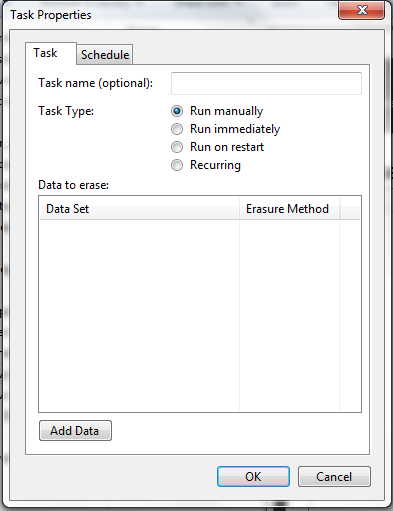
In the last post, I've told you on recovering Permanently deleted files, Now I'm gonna show you how to Permanently delete file that 'Recuva' Cannot Recover. For this, you have to download a Software called Eraser. You can download it here.


Step 1: Open Eraser software.
Step 2: Press CTRL+N to create a new task.
Step 3: If you want, give a task name, select the task type, which means to run the task now or later or at a specific time.


Step 4: click on Add data button give erasure method(leave it if not known.) Add the path of the file or whole files in a folder or a drive or recycle bin, that you want to delete. and click on Ok button.


Step 5: if you've clicked on Run Immediately it'll be done as soon as you click on ok button, if you've clicked Run Manually, Right click that task and select Run now button.
Enjoy deleting without traces...
Continue Reading

How to recover permanently deleted files in Windows

In this post, I'm gonna show you how to recover deleted files from recycle bin. Its by using a software called Recuva. You can download Recuva from here. After downloading, Install it.
Recuva Can recover most deleted files that exists in your computer in the form of dead files. Windows have no access to these dead files.


Step 1: Open Recuva.

Step 2: Give the file format of the deleted file, give the option 'All files', if you don't know the format.


Step 3: Click next and give the location of the deleted file. select, I'm not sure if you don't know the location.


Step 4: Now click next. and click on start button.


Step 5: after you get the recovered files, Select the file you want to recover and click on recover button.


Now enjoy the power of fearless deleting...

Continue Reading

Go Back Function using JavaScript

"Go Back" function using Javascript. In this post, you'll see how to add a "Go Back" button to a webpage.


The code for the button:

<input type="button" value="Go Back one page" onclick="history.back(-1)" />
enjoy.
Continue Reading

Making Text Blurry in CSS.

In this post, you'll see how to make any text blurry using CSS. its simple.


.blur {
   color: transparent;
   text-shadow: 0 0 5px rgba(0,0,0,0.5);
}
The CSS selector 'text-shadow' is compatible with more browsers. after making its color transparent, and having a shadow makes it appear as blurry.
Continue Reading

Create a folder with invalid file name in Windows

Have you ever tried to make a folder named ‘CON’ ? Its impossible, because it’s an invalid folder name for windows. There is many such names like: CON, AUX, PRN, NUL, COM1, COM2, COM3, COM4, COM5, COM6, COM7, COM8, COM9, LPT1, LPT2, LPT3, LPT4, LPT5, LPT6, LPT7, LPT8 and LPT9. But you can now create such folder with a simple trick.


Step 1: Open Command Prompt, then Type

mkdir \\.\E:\CON
The red coloured text is the folder name here and the Blue Colour, Drive alphabet. Then Verify that folder by

dir \\.\E:\CON
Now that folder is Created. In this way you can create all the file names mentioned above. To delete that folder, type,

rmdir \\.\E:\CON
Enjoy.
Continue Reading

Jovel's Blog Scroll bar using CSS.

Seeing your old scroll bar bores you ? No More Boring... here's a good looking scroll bar for websites and Blogs, Created with CSS.


Best Viewed in Google Chrome.

Here's the CSS code.

::-webkit-scrollbar{ width: 8px; } ::-webkit-scrollbar-track{ -webkit-box-shadow: inset 0 0 6px rgba(0,0,0,0.3); -ms-box-shadow: inset 0 0 6px rgba(0,0,0,0.3); border-radius: 0px; } ::-webkit-scrollbar-thumb{ border-radius: 0px; -webkit-box-shadow: inset 0 0 6px rgba(0,0,0,0.5); -ms-box-shadow: inset 0 0 6px rgba(0,0,0,0.5); }

for Blogger users,
Select your blog and go to Template -> Customize., Click the Advanced tab and select Add CSS then paste this code.

For Websites,
Paste this code before </style> Tag.

Enjoy your new look of Scroll bar.
Continue Reading

How to create a Bootable USB Stick for Ubuntu.

Recently I've Downloaded the latest Ubuntu 13.04 Disc image file. For burning purpose, I went to a nearest store to buy DVD but, there is no stock there. Its really inconvenient to buy CD that is out of stock, A better way is USB stick and Most newer PCs supports USB booting.


Requirements.


1 USB Stick with atleast 2GB Free Space.


Steps.


1. Insert your USB Stick.


2. Download Universal USB Installer from here.


3. Select your Linux Version from the Dropdown list.


4. Now from the second step, Browse for your Ubuntu .iso file.


5. From the third step, Select your USB. (mine J:\Spike 14GB)


6. You're almost done, now click on Create button.

7. A dialog Box Appears, Click Yes.


8. Now you're USB will be processed to be a Bootable USB Stick.


You Can format your USB to make it the way it was.

Continue Reading

5 steps to Speed up your Android.

Your device has a limited amount of internal storage and the less free space it has the slower it will perform. 


1. Uninstall all the Unwanted Applications from your phone.


2. Clear the Cache of Apps.

AppCache Cleaner and Clean Master are some softwares which are available for free and Useful.

3. Remember to add less widgets to your homescreen and Limit Live wallpapers.

having many widgets eats you Battery life and make your device slow.

4. Disable all animations including, window animation scale, transition animation scale, animator duration scale.


5. Update your software to the latest.


Continue Reading

VLC Magic

Bored...? then Have some fun with your frequent Media Player, VLC. create a Black hole with it.


Step 1: Open VLC Media Player.

Step 2: Press CTRL+N

Step 3:type screen:// then press enter.

See for yourself, Don't get caught.


Continue Reading